AI-Orchestrated design workflow from intent to proof of concept prototype
View on Medium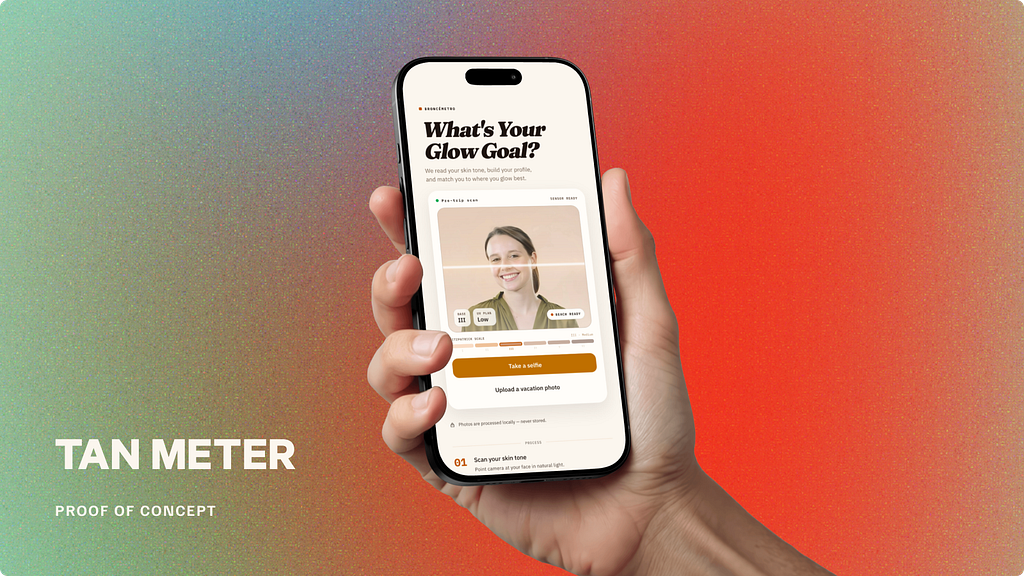
This project was developed using a multi-agent AI workflow, where different tools were orchestrated across stages from intent definition and visual exploration to implementation and refinement. Each tool was used strategically based on its strengths, enabling rapid iteration while maintaining design intent.”
Proof of concept prototype here
1. DISCOVERY PHASE
The Concept
Tan Meter is built around a simple but provocative idea: what if your tan became a playful indicator of how much you are actually living, traveling, and experiencing the world?
Today, many people postpone vacations because of time, budget, or the overwhelming pressure of choosing the “perfect” destination. Planning a trip often feels like work rather than inspiration. Tan Meter reframes that decision-making process into something lighter, more emotional, and more fun.
Instead of starting with flights, prices, or hotel filters, Tan Meter starts with you.
How It Works?
The platform analyzes your current tanning level and uses it as the foundation to recommend destinations, experiences, and activities tailored to your lifestyle, season, and travel goals. Someone with little sun exposure might receive recommendations for warm tropical escapes, beach destinations, or outdoor adventure itineraries. Someone already deeply tanned might be guided toward cultural summer experiences, coastal cities, sailing trips, or wellness retreats.
Instead of showing users a generic percentage or score, the platform assigns personalized tan identities and levels transforming the experience into something people naturally want to talk about and compare. Your tan status becomes part travel badge, part lifestyle identity.
Someone might be classified as:
- “Winter Survivor”
- “Golden Hour”
- “Mediterranean Mode”
- “Caribbean Elite”
- “UV Nomad”
- “Sun Chaser”
The idea is to make the experience feel entertaining without losing credibility.
Proof of Concept
For airlines, travel agencies, resorts, and tourism brands, Tan Meter creates a new emotional entry point into travel discovery. Instead of selling destinations through generic offers, they can participate in a system that encourages people to continuously “level up” their experiences through travel and outdoor living.
All this sounds intresting but is nothing until is tangible and can be tested and experienced to see if really could bring value to the turism industry. Here is where AI plays a key role allowing me to create a quick proof of concept prototype, I’ll walk you through my process, what I learned and the results I achieved in 8h of work.
The AI-Based Design Workflow
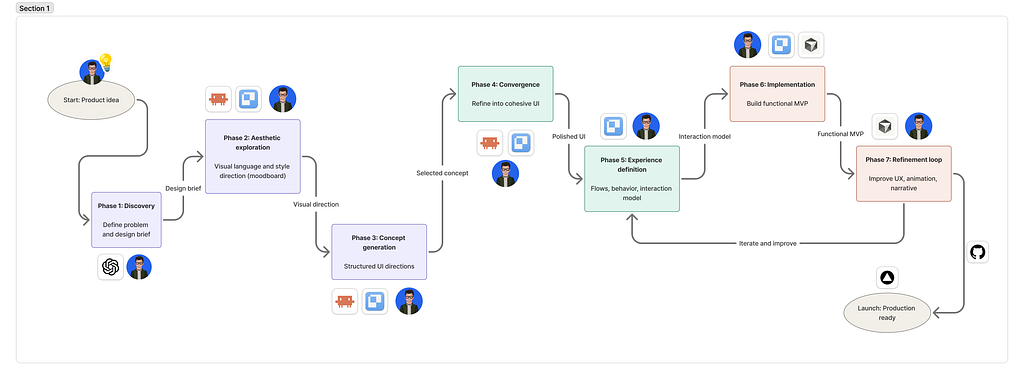
To bring this idea to life I started by putting all what you read above as prompt into chat GPT, so that it could assist me brainstorming to generate all the context artifacts I needed to enter my first prompt (.md files with all the context needed). I learned from several workshops I’ve taken in AI-First workflows that the anatomy of your initial prompt matters a lot, not only for reducing the number of tokens your agent consumes but also for getting more accurate results. This process is called “context engineering” and was my very first step.
Some of the parts you must include in your prompt are: Task + Success criteria, Context Files (.md), Reference (screenshots, rename them with “always” or “never”), success brief (type of output + scope), Rules (my standards, my constraints, my don’ts, audience, etc..) and always plan first, most of coding tools have a feature to plan. Cursor e.g: /plan, Claude Code (/create a plan). Otherwise just add something like “Give me as result your execution plan (5 steps maximum)”.
2. IDEATION PHASE: AESTHETIC EXPLORATION (MOODBOARD)
My stack to craft the visual concept based on my rational concept or brief was Claude Code + Paper, I wanted to try out this combination seduced by the idea of seeing what the agent was doing while it was working. I liked the process of asking Claude to take all the context I placed in Paper as context to run my prompt (Paper is like figma but for agents, it crafts HTML directly out of your prompts). Part of the task I requested was generating 3 different asthetic explorations for the landing page (focusing in less is better, I didn’t ask build me an entire app, I started only with the landing page.
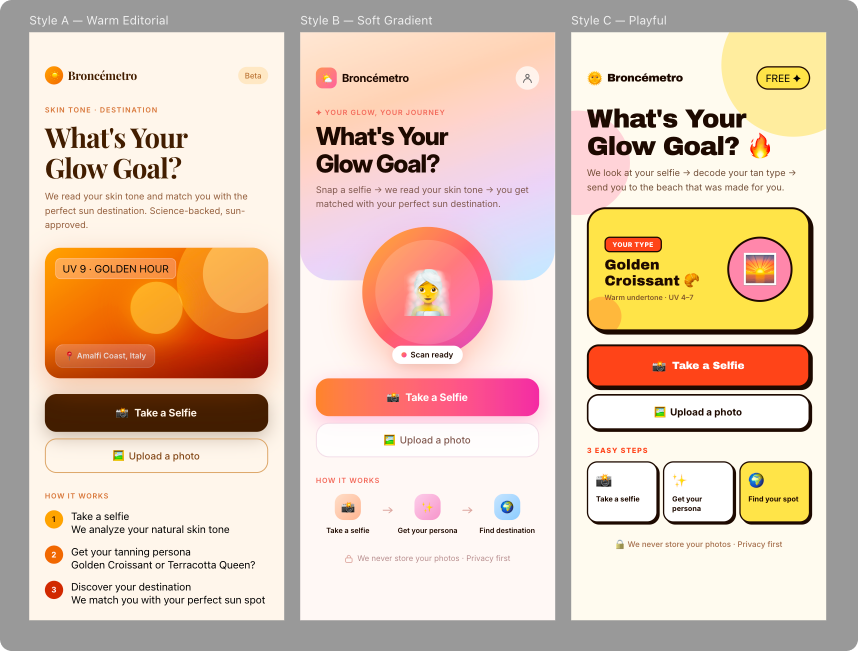
I know what you are thinking, it looks AI-generated. I thought the same, however, It wasn’t completely lost, I could see that it have comprehended my intent and my idea pretty well. The process was there (taking a picture -> processing the pic -> delivering results), the vibe in terms of colours was there too, it was something I asked for, to use warm colours, summer oriented look and feel, smooth gradients, etc… It was a good start point.
3. CONCEPT GENERATION PHASE
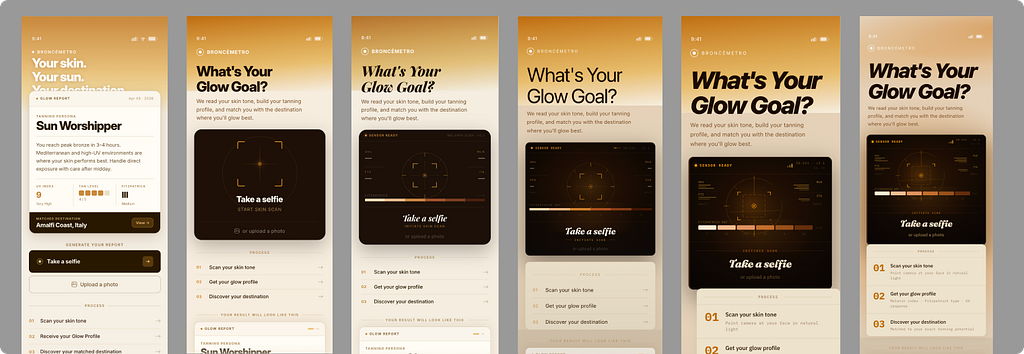
During this phase I was iterating with the machine, asking for options or styles that would help me to find the right typography pairing and colour schemes aligned with my idea. I wanted the experience to feel modern and fun, while still credible enough to generate trust.
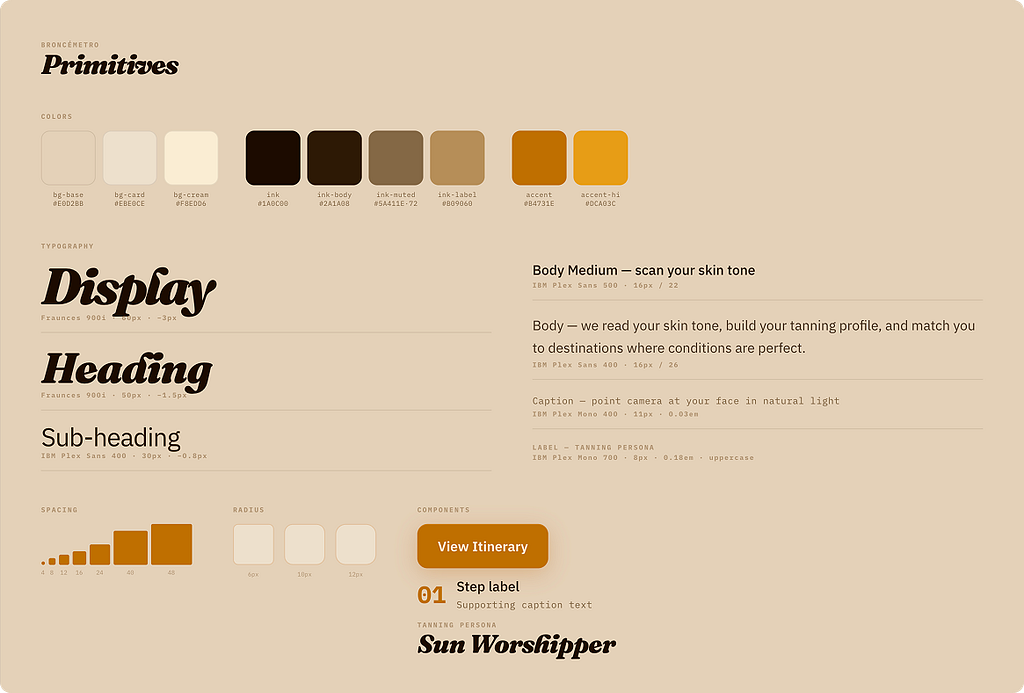
At first Claude Code was generating very dimmed colours for secondary labels, almost too difficult to read. Isolating the this mini style-guide allowed me to spot several contrast issues and spacing inconsistencies.
4. REFINE EXPERIENCE DEFINITION PHASE
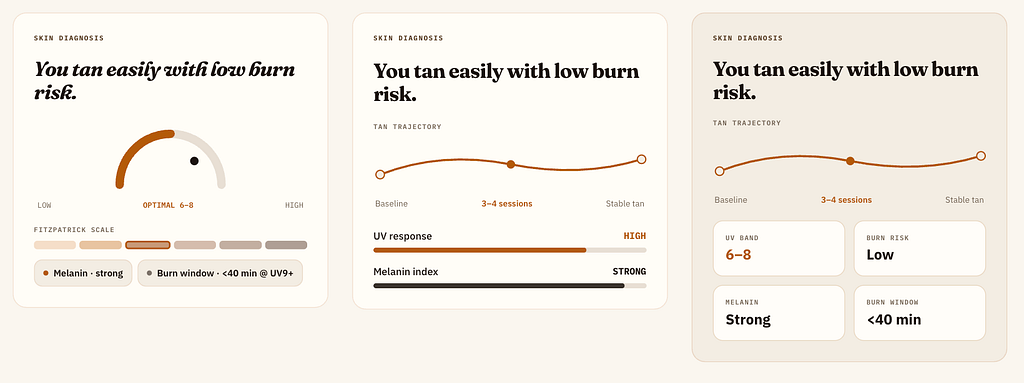
Once I had a clear set of styles based on my landing page, meaning that I could feel the concept and the process well explained and I had good enough MVP material, I asked Claude Code to generate the happy path for my experience. After that I asked to identify some key edge cases that could block the experience.
I explored different ways of visualizing the results data so that it would feel interesting, shareable, scientific. I was surprised of how well it worked at this point to take the pieces one by one, e.g.: skin diagnosis section and refine it, it was giving me better results, more control. Additionally, thanks to Paper, I was able to see in real time the results and tweak on the fly minor flaws or combining iterations pieces to make my own.
5. IMPLEMENTATION PHASE: BUILD A FUNCTIONAL MVP
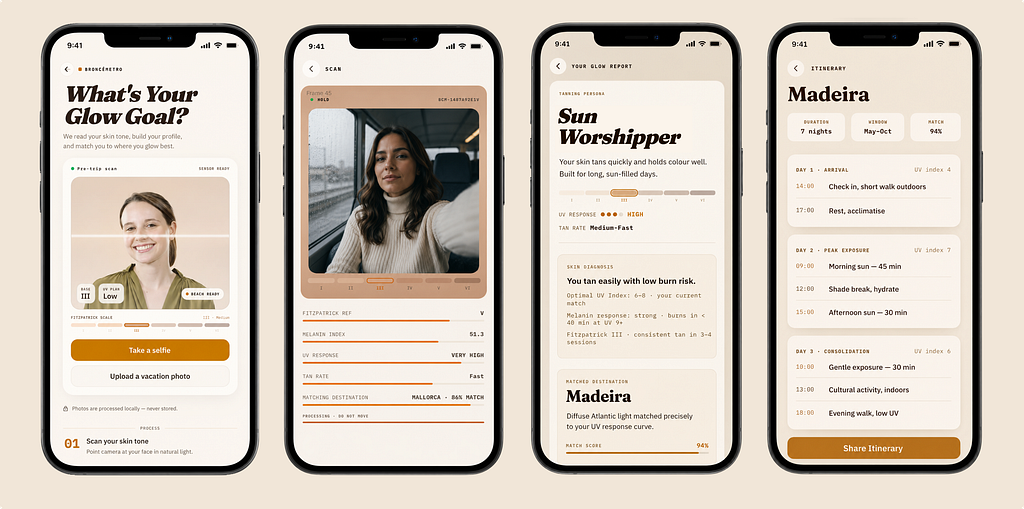
Once I locked a happy path good enough for my MVP (not perfect, its a proof of concept) I developed a few edge cases to address the scenarios that could block the experience, e.g: failure accessing to webcam or parallel workflow uploading a picture.
After locking-in my MVP, I did a few more passes refining little details aroung the interactions and the overall flow. I must say refining this to perfection using AI solely could take a while, almost same as doing manually and sometimes way more frustrating.
6. DEPLOY PHASE: PRODUCTION READY
as a final step I created a repository in Github and asked Claude to deploy my MVP to Vercel. At this point I tried for first time the workflow for iterating and exploring at the implementation level. Branching to ideate new posibilities and merging when I am happy with the changes, keeping safe the previous iteration in case the new idea didn’t work out or it was taking longer than expected. I was forcing myself to finish this in a reasonable amount of time to make it count as a proof of concept thinking in the sole scenario where you want to convince stakeholders of why your idea is worth taking further.
WHAT I LEARNED
During this project, AI significantly Accelerated my brainstorming process. It can act as a fresh pair of eyes, looking at your idea from several lenses and helping you target your audience more effectively.
Context first, always. As much as you can. Yes… it can feel “boring”, but the results improves dramatically.
AI can easily produce generic outputs if you don’t break your ideas into features or building blocks first. Crafting those foundational pieces early creates a much stronger base that can evolve naturally over time.
Human judgment still matters. Expert criteria is what drives the boat towards success. It Acts as the railroads that keep the idea moving in one clear direction, regardless if a project takes a few hours or weeks of iteration and production.
NEXT STEPS?
I couldn’t help trying out something myself based on my AI-Assisted workflow, I tryed out a few ideas based in quick moodboard around the same vibe and colours, with illustrations, Icons, and different typography pairings.
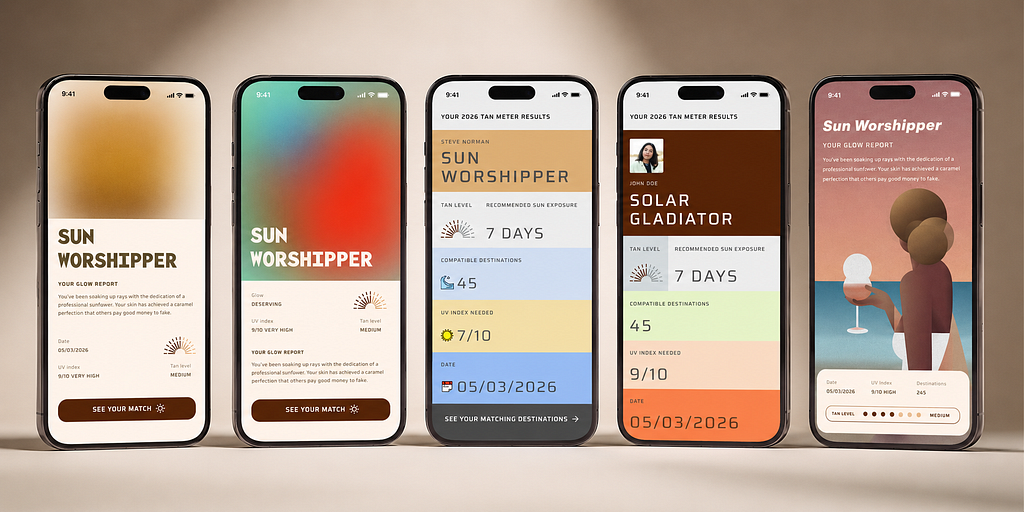
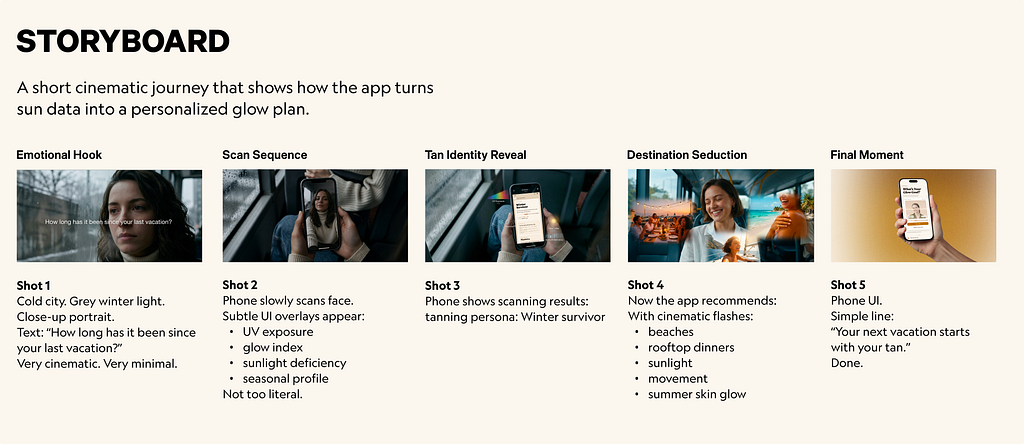
If I would be taking this further, I would have put some more time generating a promo video using Runway or similar tool. AI makes selling an idea way faster than before. So why not generating a quick script or storyboard to build a teaser to support your idea?
I was amazed with Runway’s “workflow” feature. Excited about trying that out next.
Thanks for reading and following along through the process.